

Access Manager Guide
Approving, provisioning and revoking access to company systems
HR.Click · Access Manager GuideManaging access
1Your role in two minutes
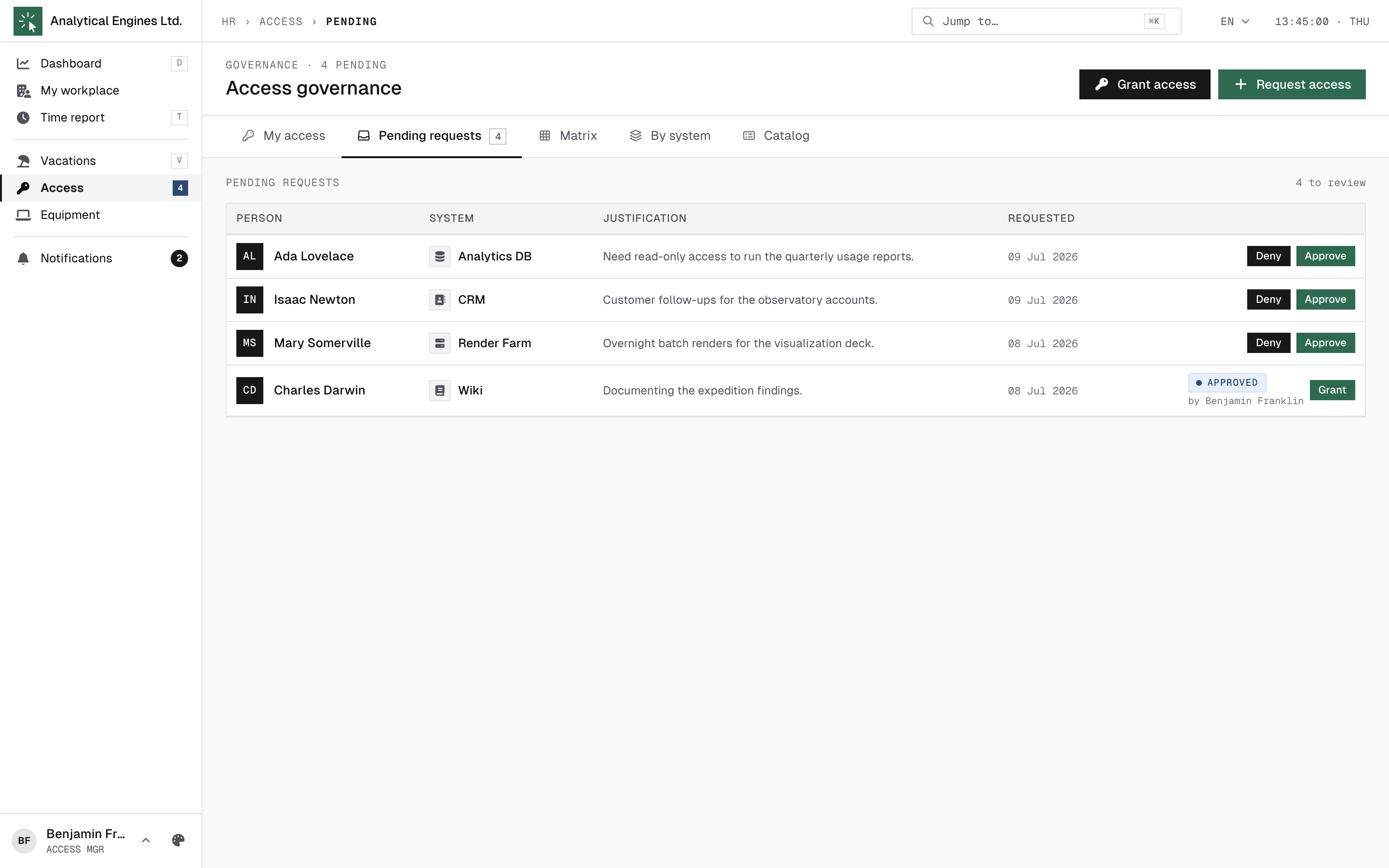
As an access manager you decide who may use which company system, and you keep the system catalogue tidy. On the Access page (its sidebar badge shows the pending count) you get four extra tabs beyond “My access”: Pending requests, Matrix, By system and Catalog. When something is waiting, the page opens straight on Pending.
A request travels Requested → Approved → Granted (Active) → Revoked. Two roles share the work: you approve or deny (the decision), and the system owner provisions (creates the account and records the login). An owner cannot approve — and you can both approve and provision, including in one step. Every step is written to the audit log.
The same separation applies to you: unless you are also an administrator, you cannot approve or grant your own access request — another access manager or an admin decides it.
2The Pending queue
Each row is a request: who (with their current position), which system, and their written justification. Three actions:
- Approve — the request moves to Approved; the system’s owner is notified that they can set the account up.
- Deny — closes the request. The employee sees “Denied” (with your note) in their own tracker.
- Grant — approve and provision in one go (section 3).
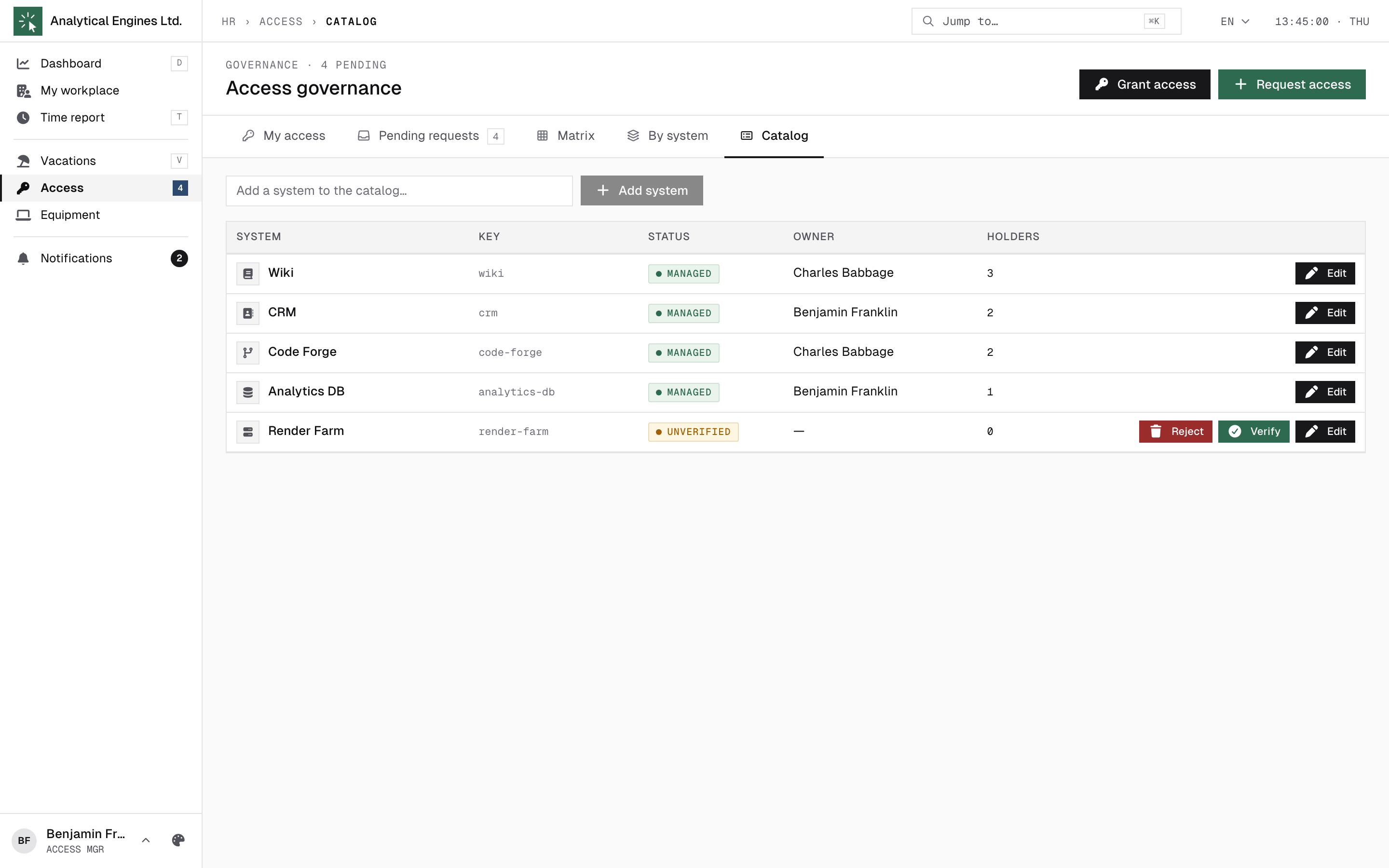
If an employee asks for a system that isn’t in the catalogue yet, it appears automatically as unverified. Verify it (and assign an owner) in the Catalog before granting — or reject it if it shouldn’t exist.
3Provisioning — recording the account
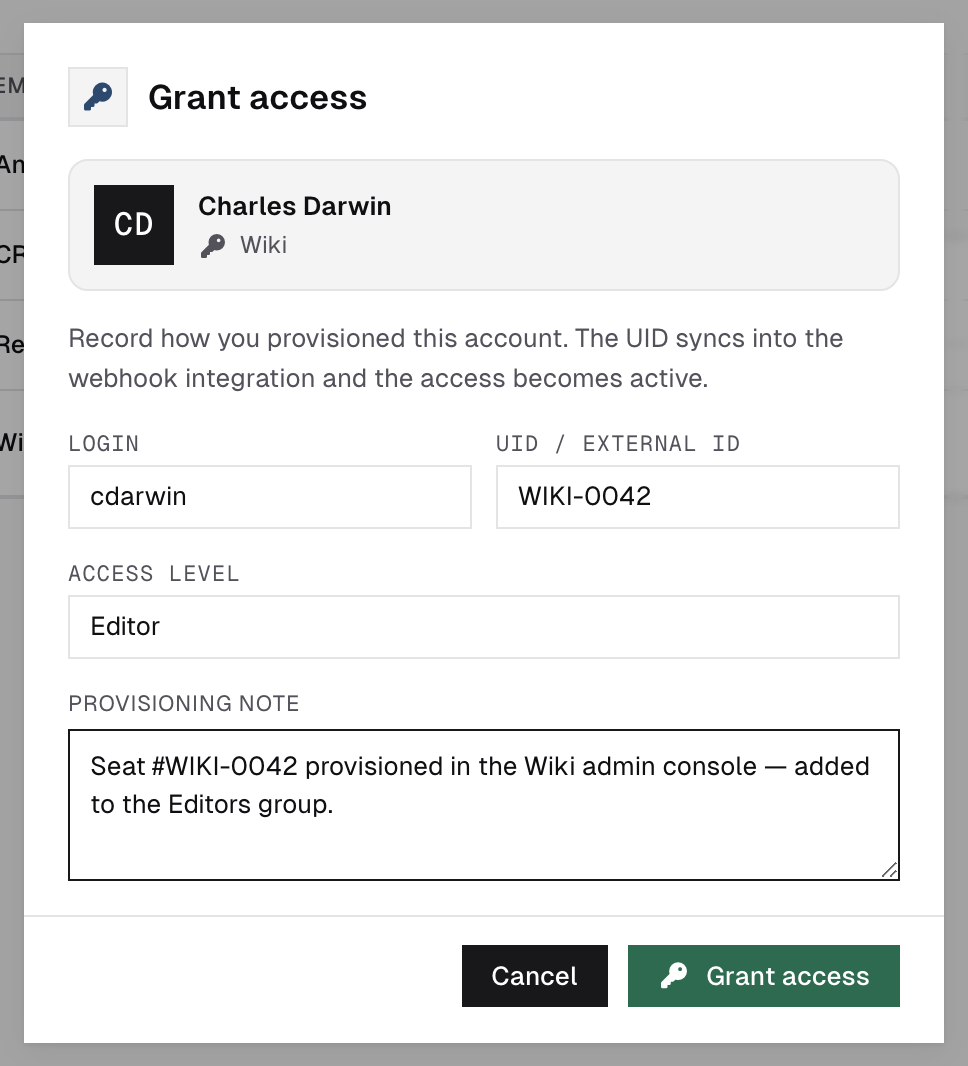
Grant opens the provisioning dialog. Once the account actually exists in the target system, record it here:
- Login — the username in that system.
- Machine UID — the system’s internal id (used for webhook matching).
- Access level — free-form label (Editor, Developer, Read-only…).
- Note — anything worth remembering; it’s kept in the audit trail.
The grant flips to Active and appears in the employee’s “My access” with the login you recorded.
Direct grant:Grant access on the page header skips the request entirely — pick the person and the system, fill the same fields, done. Use it when access was arranged outside HR.Click.
A direct grant or a grant correction can carry a real historical start date instead of “now” — useful when importing access that already existed. This is restricted to administrators and isn’t exposed as a field in either dialog; if a grant’s start date needs backdating or correcting, ask an administrator to arrange it.
4Matrix, By system, and revoking
The Matrix and By system
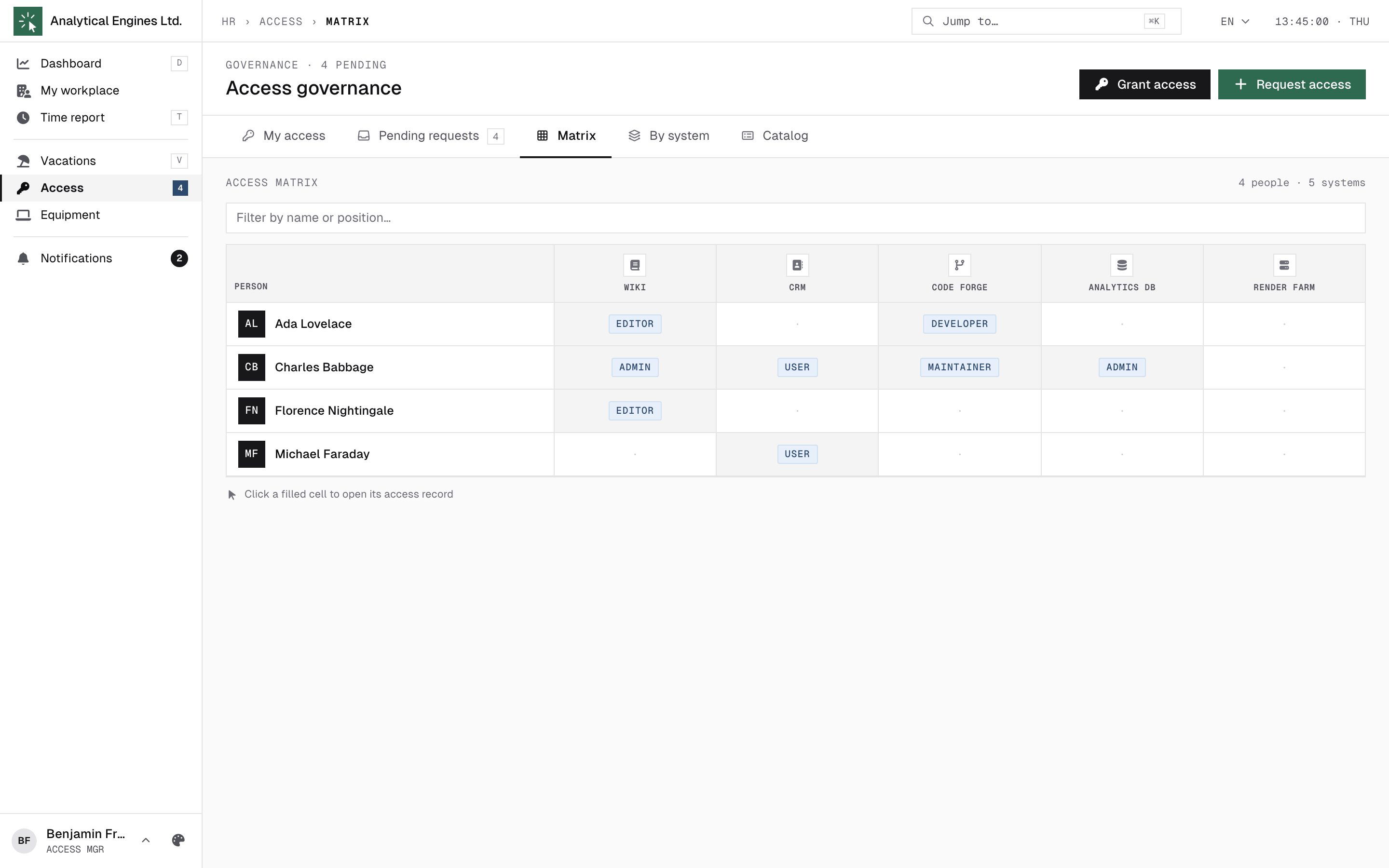
The Matrix is your who-has-what grid: people × systems, each filled cell showing the level, or the login on file (falling back to the external id if no login was recorded). By system lists all holders of one system. Both list people with their current position under their name. Click any grant to open its details.
A quick filter above the grid narrows the matrix — and the By-system holders list — to a name or position match, and reports how many rows it is hiding. Hovering a matrix cell highlights its whole row and column, so a filled cell far from the header is still easy to trace back to its person and system.
Grant details and revoking
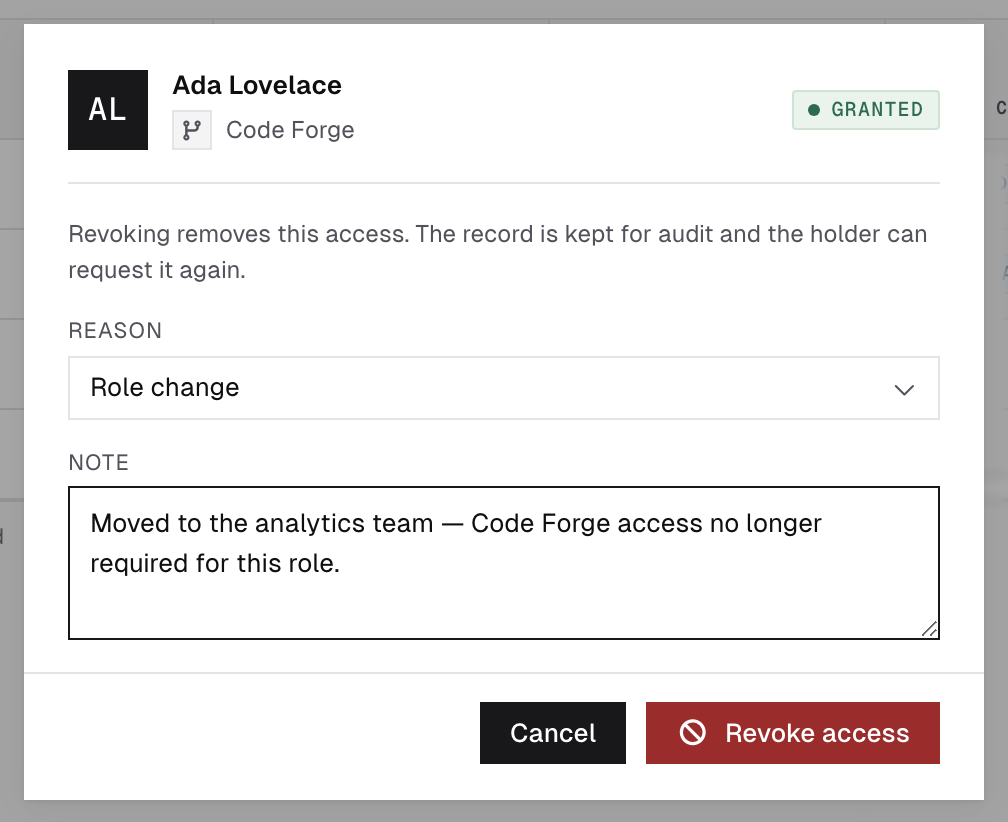
In the grant details you can edit the login / UID / level, or revoke: pick a reason — No longer needed, Role change, Policy, Other — plus an optional note. The system owner and administrators are notified; the grant stays visible to the employee as “Revoked” so nothing disappears silently.
When someone leaves the company, their grants are also revocable in bulk from the admin offboarding wizard (reason “offboarding”).
A leaver keeps working access through their last working day. The offboarding report emailed to every system owner (and to you) states the exact cutoff — the last working day plus the hours in force that day, in the office's own time — with a “keep this open until X, remove it after” line. If a system is wired to the access.revoke_due webhook instead, HR.Click queues that notification for office-local midnight after the last working day rather than firing it the moment offboarding runs, so an integration that acts on it won't cut anyone off mid-shift.
5The Catalog
Catalog (managers only) is the source of truth for systems:
- Add system — name, owner (who will provision it), category, icon, description.
- Unverified systems (auto-created from requests) show Verify — confirm it’s real and assign the owner — or Reject & delete, which also closes any open requests pointing at it. A system with active grants can’t be rejected.
- Owners see the Matrix and By-system views scoped to their systems and can provision approved requests — but the Catalog and approvals remain yours.
6How you’re notified
| Subject / title | When |
|---|---|
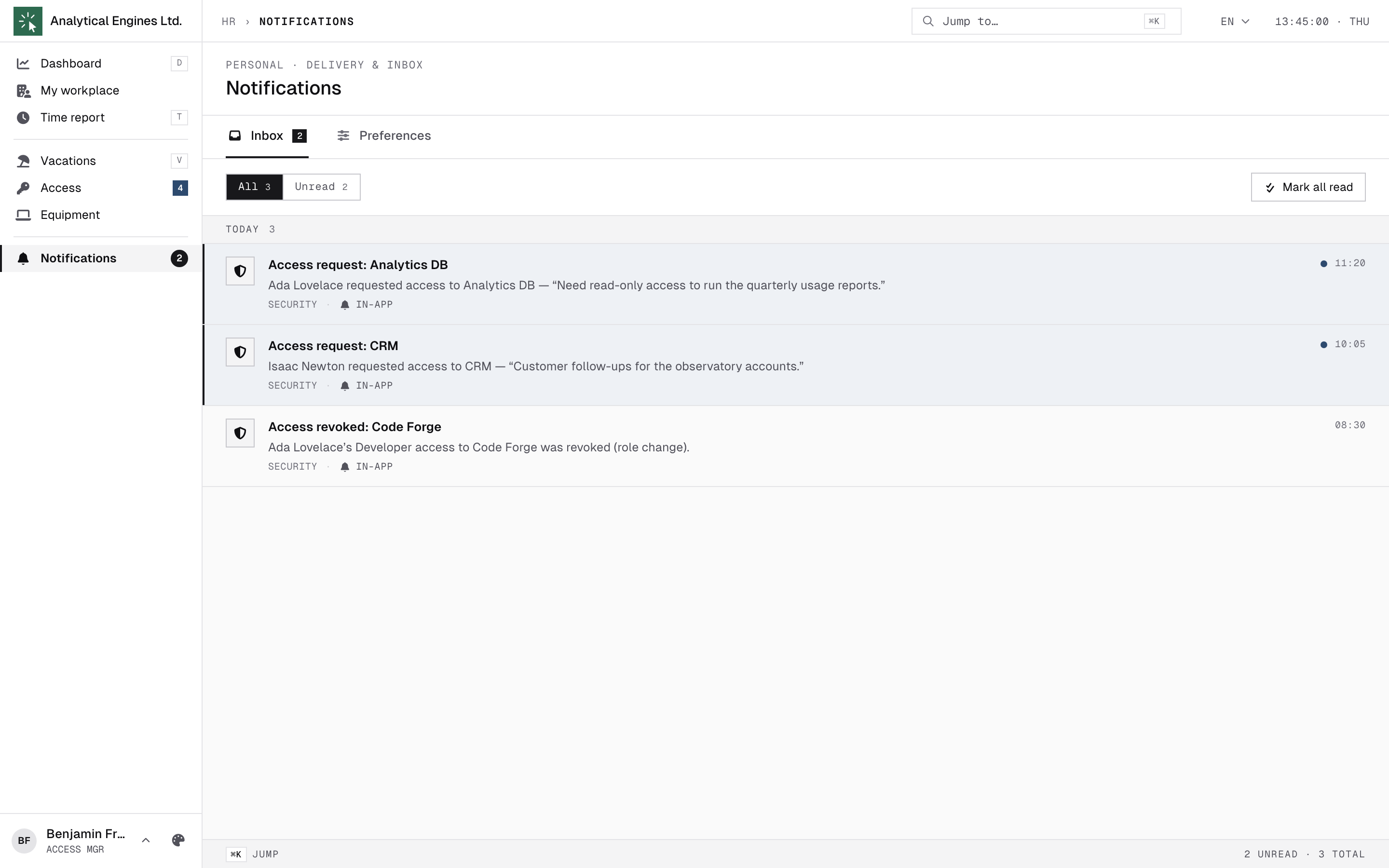
| Access request: <system> | An employee submitted a request — arrives to all access managers (and the system owner) by e-mail and in-app. |
| Access approved: <system> | Sent to the system owner after your approval — their cue to provision. |
| Access revoked: <system> | A grant was revoked — owner and administrators are informed. |
The requesting employee is not pinged on decisions — they follow their request’s status badge (Pending / Approved / Granted / Denied / Revoked) on their own Access page. For anything urgent, tell them directly.
7Day-to-day checklist
| Situation | What to do |
|---|---|
| “Access request: …” arrives | Pending queue → read the justification → Approve (owner provisions) or Grant yourself. |
| Request names an unknown system | Catalog → the unverified entry → Verify + assign an owner, or Reject & delete. |
| Someone changed roles | Matrix → their column of grants → revoke what no longer applies (reason “Role change”). |
| Security review asks “who can touch X?” | By system → pick X — every active holder with level and account. |
| Provisioned outside HR.Click | Grant access (direct) — record the person, system, login and level so the matrix stays true. |
| Employee left | Offboarding (admin wizard) revokes in bulk; spot-check their Matrix column afterwards. |
HR.Click — Access Manager Guide · v1.2 · October 2026. Product screens shown with sample data; names of persons are fictitious examples.